
Features
Everything a converting checkout needs. Nothing it doesn't.
Built from scratch on PHP 8.1. Every feature is deliberate, every decision is yours. No paywall between you and the tools that make your checkout work.
Checkout flow
Guided 3-step checkout
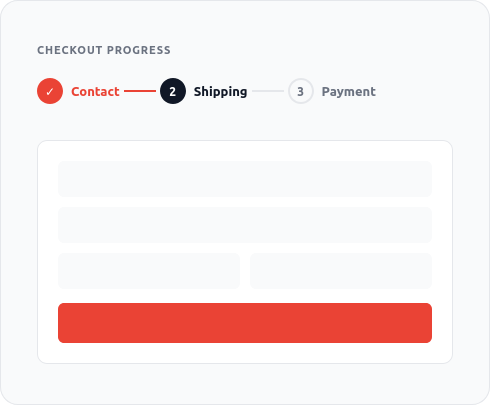
WooCommerce's default checkout puts every field on one long page. Customers hit it, feel overwhelmed, and leave. The 3-step flow breaks that into Contact, Shipping, and Payment — three focused screens where each step has a clear job.
A progress indicator shows exactly where the customer is. Back navigation works at every step. The layout is clean and uncluttered — no sidebar widgets, no unnecessary fields.
Step 1: Contact — name, email, billing address
Step 2: Shipping — address, method selection, delivery notes
Step 3: Payment — gateway selection, order review, place order
Progress bar always visible, back navigation at every step
Toggle between 3-step and one-page mode in the admin
One-page mode
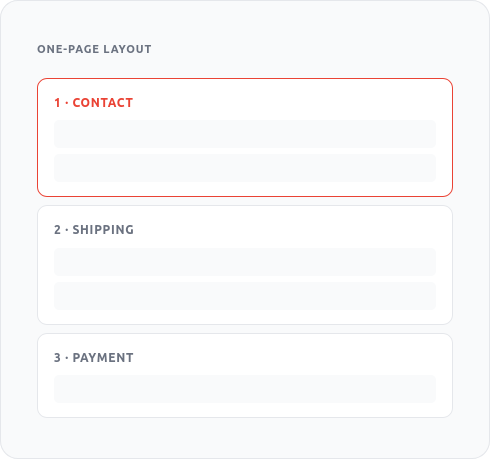
Some stores convert better with all steps visible at once. Toggle one-page mode from the Swift Checkout settings and every section is shown on a single scrolling layout — same clean design, same live sidebar, no page reloads between sections.
Both modes use the same underlying template and share all other features. You can switch between them at any time without reconfiguring anything else.
All three sections displayed on a single scrollable page
Same live sidebar, AJAX updates, and order bumps as 3-step mode
Switch modes with a single setting — no reconfiguration needed
Well-suited for stores with simple products and short checkout forms
Order summary
Live order summary sidebar
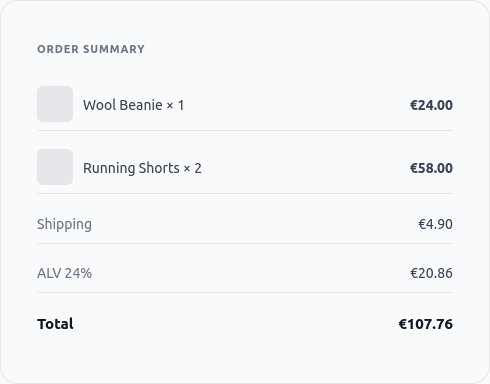
Customers who can see their order while they're filling in fields are less likely to abandon. The live sidebar shows product thumbnails, quantities, shipping method, and a full cost breakdown — updated in real time as they make changes.
Tax is shown by name and rate, not just as a number. If your store uses Finnish ALV or German MwSt, that label appears next to the amount. No surprises at the final step.
Product thumbnails, names, quantities, and line prices
Shipping cost updates live as the customer selects their method
Tax displayed by name and rate (e.g. "ALV 24%", "MwSt 19%")
Coupon code field and discount line shown inline
Always visible — no toggling or expanding required

Side cart drawer
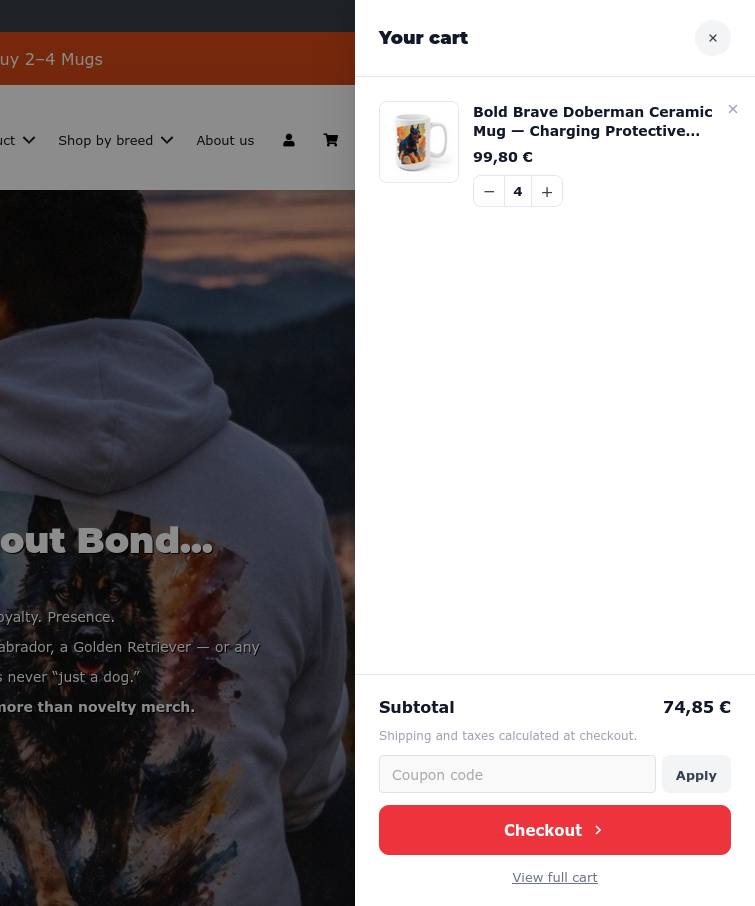
The side cart appears on every page of your store — not just the checkout. Customers can review their cart, change quantities, remove items, and go straight to checkout without navigating away from the product they're browsing.
This recovers sessions that would otherwise end with a customer forgetting what was in their cart or getting distracted mid-browse. The cart icon in your header opens the drawer; a close button or clicking outside dismisses it.
Slide-out drawer triggered from the cart icon — no page load
Quantity controls and remove buttons inline
Running total and direct checkout button
Works on product pages, category pages, and everywhere else
No theme conflict — overlays rather than injecting into theme layout
Revenue tools
Order bumps
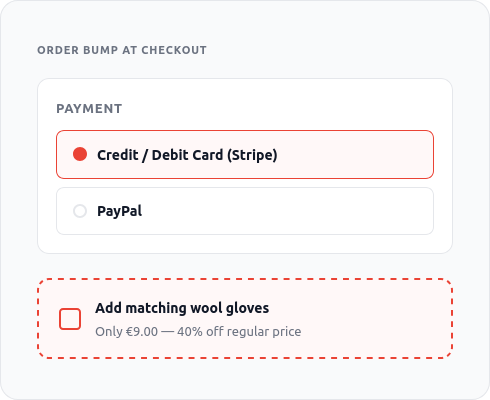
An order bump is a one-click add-on shown at the payment step — after the customer has already committed to buying. The friction is almost zero: no new page, no separate cart action. One checkbox and the item is added.
You control what's offered, how it's priced, and how it's framed. A fixed add-on price, a percentage discount, or a free gift for orders over a threshold. All three models are supported and configurable from the admin without code.
Fixed price: offer a specific product at a set price
Percentage off: e.g. "Add the matching belt for 30% off"
Free: gift with purchase or threshold reward
Shown at the payment step — the highest-intent moment
One checkbox to accept; no page reload or cart update required
Configurable title, description, and image from the admin
Trust badges
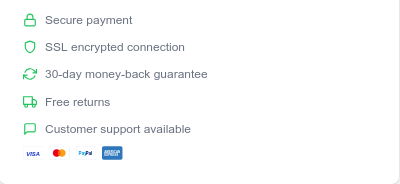
Payment hesitation peaks at the exact moment customers see the payment form. Trust badges — payment logos, security seals, money-back guarantees — reduce that hesitation without adding friction.
Upload your own badge images or use the built-in set. Position them above the payment form, below the CTA, or both. Every badge is configurable from the admin with no code or shortcode required.
Upload custom badge images (PNG, SVG) or use the built-in set
Payment gateway logos: Stripe, Visa, Mastercard, PayPal, Klarna
Security seals: SSL, encrypted checkout, PCI DSS safe
Custom text badges: "30-day money-back", "Free returns"
Position above or below the payment button
Payments
Five major gateways.Every WooCommerce gateway works.
Swift Checkout tests against the five most common European payment providers. Any other WooCommerce-compatible gateway works via standard hooks — your existing setup won't break.
Tested gateways
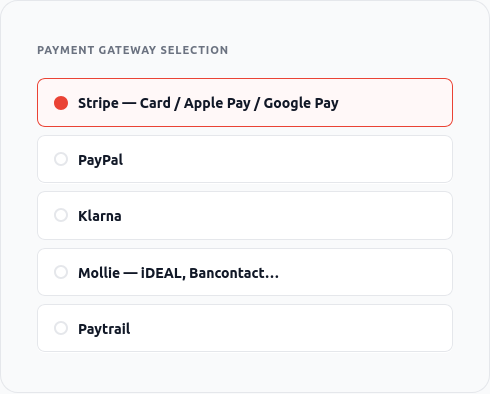
The five gateways below are tested in full checkout flows, including 3D Secure, iDEAL redirects, Klarna's hosted payment page, and Paytrail's Finnish bank routing. Edge cases are covered, not just happy paths.
Stripe — cards, Apple Pay, Google Pay, 3D Secure
PayPal — PayPal Payments standard and express checkout
Klarna — Pay Now, Pay Later, Slice It — full redirect flow
Mollie — iDEAL, Bancontact, SEPA, and 20+ more methods
Paytrail — Finnish bank routing, Aktia, OP, Nordea, S-Pankki
Any other WooCommerce-compatible gateway via standard payment hooks
Privacy & Trust
Zero telemetry. No external calls.
Some checkout plugins send usage data to third-party analytics servers. CheckoutWC, for example, calls MixPanel and an external stats server from inside your store's checkout.
Swift Checkout sends nothing. There are no outbound HTTP requests from the frontend checkout page — not to analytics, not to font CDNs, not anywhere.
This isn't a setting you configure. It's how the plugin is architected. There is no telemetry code to disable because there is no telemetry code.
No MixPanel, no Segment, no external analytics of any kind
No Google Fonts API calls — fonts are served from your own server
No deactivation survey that phones home on uninstall
No admin notices pushing upgrades or collecting opt-ins
No license enforcement system making outbound calls
GDPR-safe by architecture — not by configuration
GPL licensed — you own the code
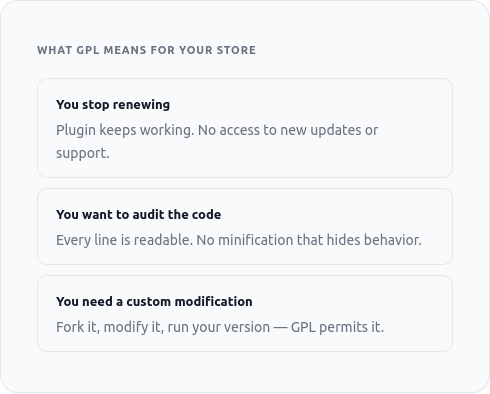
Swift Checkout is released under the GPL v2 license, consistent with WordPress itself. That means the source code is yours: you can read it, modify it, and run it indefinitely. If you stop renewing your license, the plugin keeps working.
We'd rather earn your renewal through good software and support than hold your store hostage through license enforcement. This is a deliberate choice, not a loophole.
Full GPL v2 — same license as WordPress core
Plugin keeps working after license expiry — you lose updates and support, not functionality
Source code is readable and auditable — no obfuscation
No phone-home license checks on your checkout page
You can host, modify, and distribute under GPL terms
Technical
Built to last. Built to be fast.
PHP 8.1+, no jQuery dependency, no bloated compatibility layer. The codebase is small enough to understand and fast enough not to think about.
PHP 8.1+ only
No legacy PHP 7 support to maintain. PHP 8.1 runs significantly faster than 7.x and brings typed properties, fibers, and enums. This codebase uses them.
No jQuery on the frontend
No legacy PHP 7 support to maintain. PHP 8.1 runs significantly faster than 7.x and brings typed properties, fibers, and enums. This codebase uses them.
Standard WooCommerce hooks
No legacy PHP 7 support to maintain. PHP 8.1 runs significantly faster than 7.x and brings typed properties, fibers, and enums. This codebase uses them.
No external dependencies
The plugin ships with everything it needs. No Composer packages loading from remote registries, no CDN-hosted assets, no runtime API calls to third-party services.
Theme-independent
Swift Checkout replaces the checkout page template entirely. It renders its own design regardless of your active theme — so it looks consistent across every device and every theme.
AJAX-powered updates
Shipping costs, payment totals, and coupon discounts update without reloading the page. Every change is reflected in the sidebar in real time.
Complete Feature List
Everything that's included. In every plan.
No feature tiers. No "pro" upsell. If it's listed here, you get it.
Guided 3-step checkout
Tax name + rate display (ALV, MwSt, VAT)
Side cart drawer on all pages
PayPal Payments
Paytrail (Finnish banks)
Custom logo and color in checkout header
No deactivation survey
PHP 8.1+ codebase
One-page checkout mode
AJAX-powered totals and shipping
Trust badge display — custom or built-in
Klarna
All other WooCommerce gateways via hooks
No Google Fonts API calls
No admin marketing notices
Theme-independent rendering
Live order summary sidebar
Order bumps — fixed, percentage, or free
Stripe (cards, Apple Pay, Google Pay)
Mollie (iDEAL, Bancontact, SEPA…)
Coupon code field in sidebar
No telemetry or usage tracking
GPL v2 licensed
1 year of updates and support
Comparison
Swift Checkout vs. CheckoutWC
CheckoutWC Basic ($149/year) doesn't include order bumps or a side cart — those require their Plus plan at $249/year. Swift Checkout includes everything for €89/year.
| Feature | Swift Checkout | CheckoutWC Basic |
|---|---|---|
| Annual price (1 site) | €89/year | $149/year |
| 3-step guided checkout | ✓ Yes | ✓ Yes |
| One-page checkout mode | ✓ Yes | ✓ Yes |
| Order bumps | ✓ Yes — all plans | ✗ Requires Plus ($249/yr) |
| Side cart | ✓ Yes — all plans | ✗ Requires Plus ($249/yr) |
| Trust badges | ✓ Yes | ✓ Yes |
| Tax name + rate in sidebar | ✓ Yes | ✗ No |
| No telemetry / usage tracking | ✓ Yes | ✗ Sends data to MixPanel & stats server |
| GDPR-safe (no Google Fonts API calls) | ✓ Yes | ✗ No |
| No deactivation survey | ✓ Yes | ✗ Has one |
| No admin marketing notices | ✓ Yes | ✗ Has them |
| Modern PHP 8.1+ codebase | ✓ Yes | ✗ PHP 7.4 minimum |
| GPL licensed (truly open source) | ✓ Fully open | Partial (closed dev) |
Every feature. One price.
No upsells. No paywalled features. 14-day money-back guarantee.